

VN - Video Editor & Maker
 Trusted
 7.1+
7.1+

 PEGI-3
Description of VN - Video Editor & Maker
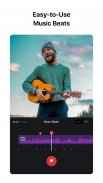
VN is a video editing application that provides users with a range of tools to create and enhance videos. This app, known simply as VN, is available for Android and can be downloaded for free. It is designed to accommodate both amateur and professional video editors, offering a user-friendly interface that requires no prior experience in video editing.
The application includes an extensive set of features that facilitate video creation. Users can choose from various text templates and font styles to match their video's aesthetic, allowing for customization in terms of font color, size, and spacing. This versatility makes it easy to add text elements that complement the video content effectively.
Editing tools are another significant aspect of VN. The keyframe animation feature allows users to create dynamic video effects using built-in keyframe animation effects. Additionally, users can add custom keyframes or curves to their footage, which enhances the overall production quality. The app also supports reverse video playback and zoom effects, providing options to create engaging visual narratives.
VN offers a Freeze Frame feature, which allows users to select a video frame and generate a still image with a duration of 1.5 seconds. This can be particularly useful for creating dramatic pauses or highlighting key moments within a video. Moreover, the app includes creative templates that enable users to design music and video templates, which can be easily shared with others.
The flexibility of VN extends to the import methods available for users. It supports importing music, sound effects, fonts, and stickers via Wi-Fi, WhatsApp, or Telegram. Users can also import files in bulk using Zip files, simplifying the process of gathering materials for editing. This feature enhances the user experience by allowing for a streamlined workflow.
Collaboration is made easy with VN's seamless project transfer capabilities. Users can transfer projects between mobile and desktop devices using Google Drive or OneDrive, ensuring that editing can be done at any time and from any location. This flexibility is particularly beneficial for those who work across multiple devices.
Security features are also incorporated into the app. Users can set expiration dates and passwords for their drafts and templates, ensuring that their projects are protected. This added layer of security is important for safeguarding valuable content and maintaining project confidentiality.
VN also allows for customization of export settings. Users can choose video resolution, frame rate, and bit rate according to their preferences, with the option to export videos in 4K resolution at up to 60 frames per second. This level of customization ensures that the final product meets the user's quality standards.
The multi-track timeline feature is a significant advantage for video editors using VN. It allows users to add picture-in-picture videos, photos, stickers, and text overlays to their projects. The intuitive design makes it simple to reorder clips and delete unwanted segments by swiping or dragging. The ability to save drafts and utilize undo/redo options supports a non-destructive editing approach, enabling users to make changes without losing original content.
VN's material library offers a wide range of stickers, fonts, and other elements that can be added to videos to enhance creativity. This library provides users with the tools necessary to personalize their videos further, adding unique touches that reflect their style.
The app's design focuses on ease of use, ensuring that users can navigate through its features without difficulty. The layout is organized, making it accessible for beginners while still providing advanced options for experienced editors. The combination of straightforward controls and powerful editing features makes VN a versatile choice for video editing.
VN supports various creative pursuits, from personal video projects to professional-grade content creation. Its extensive feature set, combined with user-friendly navigation, allows for a wide range of video styles and formats. The app's ability to adapt to different editing needs makes it a valuable tool in the realm of video production.
With VN, users have the capability to explore their creativity and produce high-quality videos with ease. The app's diverse functionalities and flexible editing environment cater to the needs of all users, whether they are creating content for social media, personal projects, or professional endeavors.
For those interested in enhancing their video editing experience, VN provides a comprehensive platform that merges usability with powerful editing tools. Its focus on collaboration, security, and customization makes VN a compelling option for anyone looking to create engaging video content.
For more information, you can visit the official website at www.vlognow.me.
VN - Video Editor & Maker - Version 2.7.0
(05-07-2025)

VN - Video Editor & Maker - APK Information
APK Version: 2.7.0Package: com.frontrow.vlogLatest Version of VN - Video Editor & Maker

Other versions























Apps in the same category


 4.22
4.22 4.4
4.4 4.39
4.39


 4.02
4.02You may also like...